
Module 2, lesson 2
Investing in Your Tools, Equipment, & Rentals for Incoming CMP Professionals
With all of the available tools around us, all seemingly waiting to be bought, investing in the right tools may be a challenging task. Remember that each creative has outcomes in mind, thus would need different equipment. This module tends to this concern with the following goals:
objectives
- Familiarize yourself with the various production tools and their technical specifications, for more informed decisions when investing in equipment
- Understand the importance of maintaining these materials
- Explore different perspectives on renting and buying equipment
EQUIPMENT BASICS
An inevitable requirement of production and creation are the equipment. A single professional shoot may require a fully accessorized camera, studio rental, printed backdrops, and high tech PCs that may seem overwhelmingly… costly.
In many careers that have to do with creative media production, there’s an expectation that you have all of these equipment for producing quality outputs. But before we blow our pockets on a full blown setup of high end gears and gadgets, let’s remember that even the basics can produce masterpieces.
Down to the basics: Camera, Audio, and Lights. Great careers began with just one–often, a simple camera.
Camera
In film and photographic productions, you use a camera to record almost your entire visual outputs–even just a single camera can go a long way in your creative pursuits. It comes in different types and brands. We are going to skim through the most common and known kinds namely compact, DSLR, and mirrorless.
| Description | Pros | Cons | |
| Compact | Small cameras with retractable lenses | Most portable; perfect for day to day and casual photographs | Restrictive zoom range and aperture–bad for low light and far subjects; Image sensor is small, and isn’t meant for professional-grade shoots. |
| DSLR | Digital single-lens reflex camera It uses a mirrorbox and a digital sensor. | what you see in the viewfinder is what you get; there is a wide range of lenses you can select from; they are generally cheaper from mirrorless cameras as they are of older technology | They are bulkier and heavier due to the mirror mechanism; they do not have advanced features such as focus mechanisms and real time adjustments. |
| Mirrorless | The sensor can omit the image accurately without the need for a mirrorbox. | They use the latest technology, offering real-time previews; they are lighter and more compact with faster focus systems. | They are generally more expensive and have shorter battery life. |
Often, regardless of the kind of camera you are using, the main parts that are necessary for its functioning are the lens, shutter, viewfinder, body, and aperture. For purchasing and selecting your gear (aside from compact cameras), you are likely to have autonomy on the choice of lens and body, which carries on the rest of the operations.
Lights
The final output of a photo or video production relies heavily on how the light is emitted in the image. There are a vast number of light arrangements that one can follow in order to achieve a certain look. Based on the different techniques and light execution you want to achieve (hard light, soft light, diffused, etc.), you can look up different lighting apparatus. We can first discuss a fundamental of different light selections, namely the difference between continuous and strobe lights. Do note that the variety of light materials are not limited to the following:
| Description | Main Types | |
| Continuous | In its name itself, continuous lights stay on thus providing immediate feedback; more beginner-friendly but less versatile | LED, Fluorescent, Quarts, Tungsten incandescent lights |
| Strobes | Strobe lights let out short and intense bursts of light; these are often used with modifiers | Studio strobes, Monolights, Speedlights, Pack and Head |
Modifiers are used to better control the light output towards the subjects, most commonly:
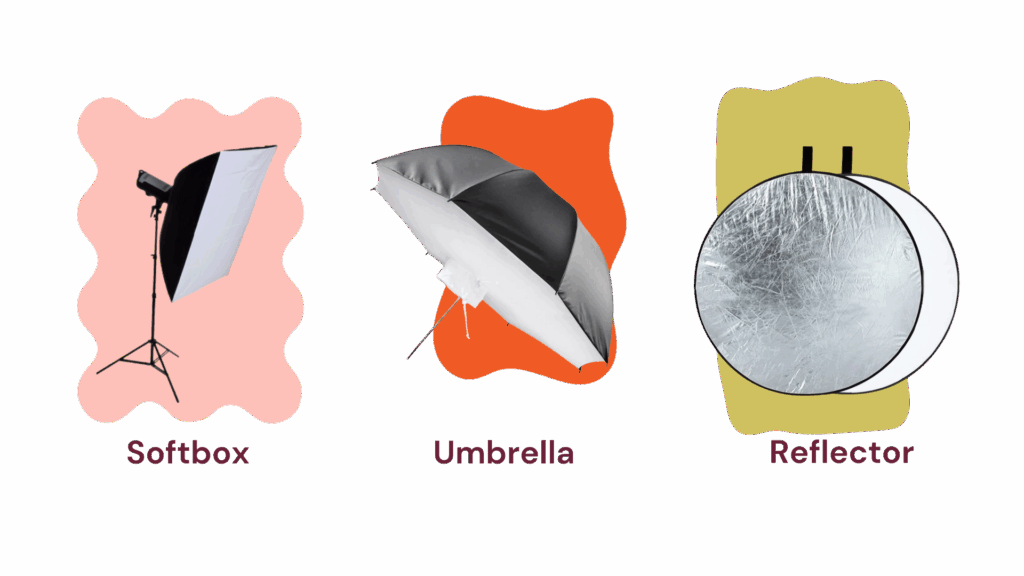
Audio
Audio gears for film and videomaking may require a kit, depending on your goals and budget. This is especially applicable to double system audio recording, which records separately from the camera with separate recording apparatus. If you’d prefer single system recording which is more ideal for quick tasks, audio quality would have to be compromised.
According to Camera Rentals NYC, here are some essentials for double systems:
- Audio Recorders
- Microphones
- Accessories (such as boom poles)
- Monitoring Headphone
There are likely to be more costly gears and materials that are needed for the entire production process; PCs (with adequate CPU, RAM, storage, and GPU) are used for monitoring the shoot, files, and of course in processing post production, set backdrops and materials such as props are investments temporarily used for the themes… These can seem like huge investments especially for independent creators, students, or smaller production teams. It may feel overwhelming to see these grand setups from production houses and feel the need to have these all already. But remember that professionalism isn’t measured by scale—it’s measured by how you maximize your resources.
WEAR AND TEAR; MAINTENANCE
In investing in production equipment, one should be aware of the wear and tear aspect of their materials. You may have the newest model now, but even high end cameras, lights, and computers degrade over time over use. This limited life expectancy is due to wearing down of its physical components. Below are examples of common points of wear and tips for maintenance across key production tools. If you are uncertain about proceeding with these recommended actions, it’s better to consult or have them done by professionals.
| CAMERA | ||
| Description | Recommended Action | |
| Shutter Count | This is mostly in the case of DSLR and mirrorless cameras. Think of a car’s mileage, that indicates its lifespan and wearing down functionality. An entry level camera should have about 50,000 shutter counts, mid-range about 150,000 and high-end about 300,000+. | However, these ratings are not always accurate for your specific specs/use. You may research your camera specifically for its actuations. |
| Sensor | A sensor can gather dust and debris, creating spots and blurs in the output. | A sensor cleaning kit, which usually includes a blower, swabs and cleaning solution. |
| Lens | An unclean and scratched lens leads to unoptimized performance. | The tools that can help are a microfiber cloth, lens cleaner solution, a blower, and a lens cleaning pen. |
| Battery Life | Camera batteries usually last around 2-3 years, with about a limit of 300-500 charging cycles. | Fortunately, batteries are easily replaceable and recommendably, you’d have multiple especially for lengthy shoots. |
| LIGHTS | ||
| Description | Recommended Action | |
| Dust/Debris | Dust and debris can accumulate, modifying the brightness and performance. | Make sure that the light is turned off and cooled down completely before cleaning; use a soft dry cloth to wipe the exterior. A can of compressed air can help for more stubborn particles. |
| Bulb | Bulbs may be in need of replacement if it’s starting to flicker, dim or change in color. | Ensure that the fixture is turned off, unplugged, and cooled down. With cloth or cloves, carefully follow the manufacturer’s instructions for replacement. |
| Modifiers (specifically softbox and diffuser) | Dust and dirt are likely to accumulate over time. | You may use damp cloth and a gentle soap to wipe the fabric every few months. Do not use it until completely dry. |
| AUDIO | ||
| Description | Recommended Action | |
| Windshield/Pop Filter | These can collect dust, saliva, and moisture, affecting audio quality. | Clean with mild soap and water (for foam), or damp cloth (for mesh). Air dry completely. |
| Cable Management | Lack of ventilation, voltage surge, dust, hear; tangled or damaged cables may cause signal loss. | Coil cables using the figure-eight or over-under method to prevent tangling, before storing them in a protective case secured with Velcro straps. |
| Battery Life | Batteries degrade due to overcharging or improper storage. | Avoid overcharging and use manufacturer chargers. Store in dry and cool areas when not in use. |
OWN EQUIPMENT/RENTALS
Fortunately for some students partaking in a course related to communications/creative pursuits, their university permits lending out equipment to uplift some of the burdens of expenses of production. If you do not have any of your own, we recommend inquiring any of the institutions you belong to for lending policies for any asset you could use.
Outside this, starters often debate on having to rent out equipment or to purchase their own. The ideal decision, however, really varies depending on the individual’s current circumstances especially when it comes to finance, experience, frequency of use, and preferences. With rentals, you can save money initially. But with your own equipment (although presumably with a bigger lump sum of costs), you are free to use your own assets as you’d prefer.
Here are some testimonies from experienced CMP practitioners that may guide you in your decisions:
Luis Danao (Part time filmmaker, part time freelancer)
Before his first gig for a shoot, Luis had to research directions on using a certain camera without much prior experience to handling one. Before this, he had worked under the table to earn enough money to have his own. Regardless, he sees the opportunity for renting out and being able to borrow as something to not miss out on for students and those on a budget. But at one point in this field, he’d have to have a camera. “I feel like when you always have your own camera, your own equipment, you can do anything, anytime, anywhere. You can practice at home. You can practice here. It really matters what you want. I think I found a lot of benefits with having my own camera. Kasi nakapag-practice ako every day. No limitations whatsoever.”
Jan Mayo (Freelance photographer)
Jan Mayo is already a professional in his field, having held an exhibit in the National Museum, and having photographed for Vogue Magazine. Presuming that he already has most of the equipment needed for a quality production, what else could he possibly rent out? One thing he’s never bought is a backdrop because of how difficult it is to store and transport. There were situations also where it was much more economical; for a shoot in Japan where he could not transport his own lights, he relied on rentals instead.
Mayo, however, started out from borrowing from his friends before starting out with his basic kit: a camera and a laptop. Essentially, this provided a lot of convenience knowing the lengthier process in renting our equipment.
PLANNING LONG-TERM INVESTMENTS
So, when do we invest in our dream kit? We are talking about long term investment, while accounting for the opportunities for rentals and the wear and tear of technological devices. These testimonials from experienced practitioners tell us of their decisions regarding this matter, serving as insightful perspectives. Especially if you’re on a budget as a student/starter in the industry, you may initially find sources for renting/borrowing before finally having your own equipment.
Before fully committing to the latest models, it’s important to start with the basics. We recommend beginning with a starter kit—after all, some equipment are called entry-level for a reason. They serve as your introduction to mastering a skill, and in this case, to understanding and operating production tools. Now, for those that are just starting out, it may seem overwhelming to surf your available sources amidst the abundance of options.
To help you in your decision, we have developed a budgeting exercise where you can set your own budget and create your own starter kit. Included in this exercise are a selection of camera, lights, audio and set materials accompanied by their sources (which includes their details, specs, and where you can look them up for actual purchase). It is completely up to your preference which characteristic you’ll want to prioritize. Be sure to check out so you can see its overall estimated budget implications!
Activities
Activity 1: Build your starter kit (with a limited budget)
Make a copy of our activity using google sheets!
Remember that you do not have to have to complete all of the equipment. If these selections are beyond your budget, check out other products from resources below and from your own trusted sources.